Horizon ERP Tutorial
Utility
Loading Utility
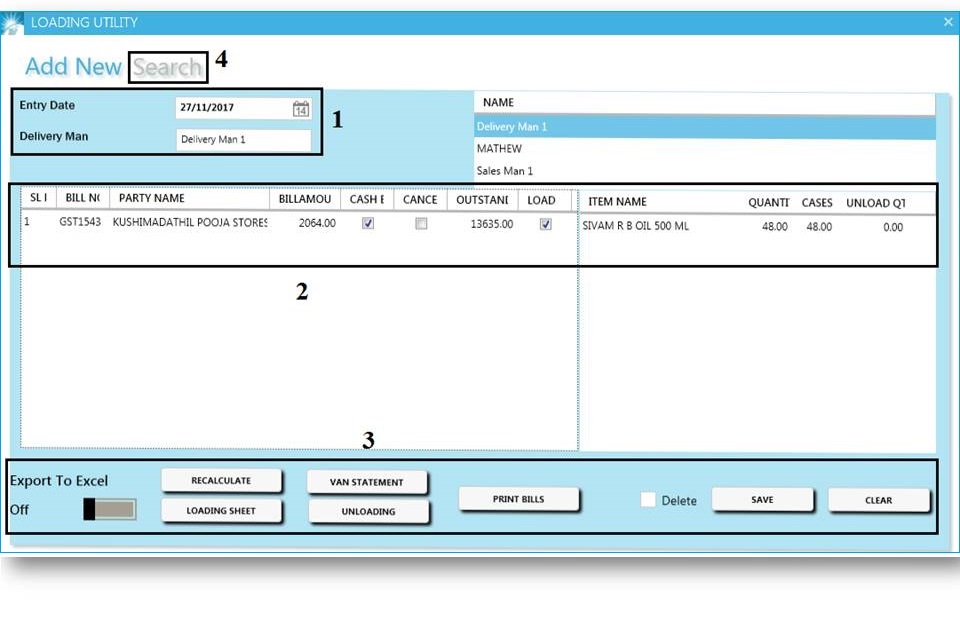
Loading Utility : It contains the reports like loading sheet, van statement, unloading and print bills.
- Entry date and Delivery man selection are mandatory.
- Reports generated based on Delivery man and Bill date.
- View all Bills under the selected delivery man for the specified date.
- On right side, listed all billed items.
- Export to excel : Turn on the button for convert this data to excel.
- Loading sheet : Generate loading sheet. It decribed the list of items and their quantity for different shops(customers) in a particular area.
- Van Statement : Generate list of bills being loaded. It shows the list of customers balance amount.
- Unloading : Uncheck the load button above, and then click to unloading for generate unloading details.
- Print bills : For printing of the above reports
- Recalculate : If we do any changes in the window (ie.;uncheck cash, uncheck load), click on recalculate for refreshing the data.
- Delete :
- Tick on Delete and update for delete the already generated loading details.
- In case, if any changes are made in bill (transactions → sales) that changes are not reflected
automatically in loading utility → then delete the already generated loading details → and
generate new one in the same date and delivery man. - Search : For view and delete the already generated loading details.